WhatsApp Order Confirmation Messages: Templates and How to Automate Them
Ready-to-use WhatsApp order confirmation templates for each stage of an order, what to include, and how to send them automatically from your shop.
On this page
- What every order message should contain
- Templates for each stage
- 1. Order received
- 2. Payment confirmed
- 3. Ready for collection
- 4. Out for delivery
- 5. Delivered
- 6. Delayed or out of stock
- Wording tips
- How to send them automatically
- Attach the invoice or receipt
- Handle the replies
- Timing matters
- Local languages
- Keep it within WhatsApp's rules
- Measure the effect
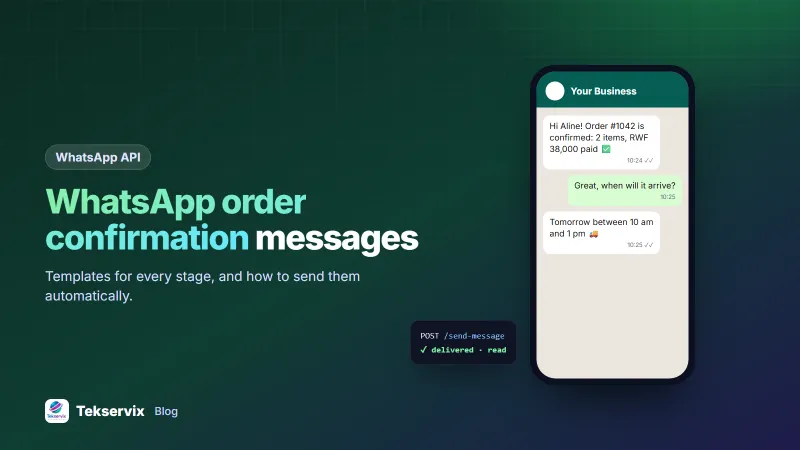
After someone pays, the next thing they want is reassurance: the order arrived, the money went through, and they know when to expect it. Email confirmations often land in a promotions tab. A WhatsApp order confirmation arrives on the lock screen within seconds, and customers can reply to it if something's wrong.
Below are templates for each stage of an order, what every message should contain, and how to send them automatically instead of typing them by hand.
What every order message should contain#
- Who it's from: your shop name, even if the number is saved.
- The order number, so both sides refer to the same thing.
- The key facts for this stage: items and total, payment status, time window, tracking link.
- What happens next, and when.
- How to get help: "Reply here if anything's wrong".
Keep each message to three or four short lines. People read these on a lock screen or while walking.
Templates for each stage#
1. Order received#
Hi {{name}}, thanks for your order at {{shop}}! Order #{{order}}: {{items}}, total {{total}}. We'll confirm payment shortly. Reply here with any questions.
2. Payment confirmed#
Payment received for order #{{order}} ({{total}}) ✅ We're preparing your items now and will message you when they're on the way.
3. Ready for collection#
Good news, {{name}}: order #{{order}} is ready at {{shop}}, {{address}}. Open today until {{closing_time}}. Show this message at the counter.
4. Out for delivery#
Order #{{order}} is on its way 🚚 Expected between {{window}}. The rider will call on arrival. Track it here: {{link}}
5. Delivered#
Delivered! We hope you love it, {{name}}. If anything isn't right, reply to this message within 7 days and we'll sort it out.
6. Delayed or out of stock#
Sorry, {{name}}: {{item}} from order #{{order}} is delayed by about {{days}} days. Reply 1 to wait, 2 to swap it, or 3 for a refund of that item.
That last template matters most. Bad news delivered early, with clear options, keeps customers who would otherwise leave a one-star review.
Wording tips#
- Use the customer's first name and your shop's name.
- Put the number first: "Order #1042 is on its way" reads faster than a long greeting.
- One emoji, used for meaning (✅ 🚚) is fine. Five is noise.
- Offer numbered replies for decisions. They're easy to answer and easy for software to read.
More wording ideas, for reminders, follow-ups and support, are in our collection of WhatsApp business message examples.
How to send them automatically#
Typing these by hand works for five orders a day. At 50 a day it eats hours. The automatic route:
- Link your shop's WhatsApp number to WApenda by scanning a QR code, and copy the API key.
- Add a hook in your shop that runs whenever an order changes status.
- Fill the template with the order's data and call
/send-message. - Save the returned message ID on the order, so you can see delivered and read status later.
POST https://tekservix.com/wapenda/api/send-message
Authorization: Bearer wpk_your_key
{"to": "+250788123456", "text": "Order #1042 is on its way 🚚 Expected between 10 am and 1 pm."}
If your shop runs on WooCommerce, our guide to WooCommerce WhatsApp notifications shows the setup with a short code snippet. For custom shops, the webhook guide shows how to receive the customer's replies too.
Attach the invoice or receipt#
Customers often ask "can you send the receipt?". Answer before they ask: send the PDF with the payment confirmation using the documentUrl field. A branded PDF from the invoice generator looks professional and saves a round of messages.
Handle the replies#
Order messages invite replies, which is the point. Decide in advance who answers them and how fast. Set keyword auto-replies for the predictable ones, such as "where is my order", "change address" or "cancel", and route the rest to a person. A delivery update that gets no answer when the customer replies "I'm not home today" does more harm than no update at all. Our guide to WhatsApp auto-replies shows how to set these up.
Timing matters#
- Send "order received" within a minute of checkout.
- Send "out for delivery" when the rider actually leaves, not when the order is packed.
- Avoid sending status updates late at night unless the customer is waiting on something urgent.
Local languages#
If many customers prefer Kinyarwanda, Swahili or French, store each customer's language at checkout and keep one version of every template per language. A message in someone's own language gets read, and answered, faster.
Keep it within WhatsApp's rules#
Order updates are messages customers expect, but stay respectful. Ask at checkout whether they want updates on WhatsApp, and keep marketing separate from order messages. Honour opt-outs immediately. The WhatsApp Business Messaging Policy sets out what's allowed, and following it protects your number.
Measure the effect#
Two numbers show whether this works: fewer "where is my order?" calls and chats, and fewer failed deliveries because customers knew when to be home. Most shops notice both within the first few weeks.
If you're new to sending WhatsApp messages from your systems, start with our guide to the WhatsApp API for small business.
Frequently asked questions
What should a WhatsApp order confirmation include?
The order number, what was ordered, the total and payment status, the expected delivery or collection time, and a way to ask a question. Keep it short enough to read on a lock screen.
Can I send WhatsApp order confirmations automatically?
Yes. Connect your shop to a WhatsApp API and send a message whenever an order's status changes. With WApenda, one HTTP request per status update is enough.
Do customers need to opt in to order confirmations?
Customers who place an order expect updates about it, but ask them at checkout whether they want updates on WhatsApp, and keep a record of their choice. Marketing messages need separate consent.

Tekservix Team
The team behind Tekservix
The Tekservix Team builds and supports Tekservix: WhatsApp and SMS APIs, AI tools, invoicing, PDF and SEO tools for growing businesses. We write practical, tested guides based on what we see our customers do every day.
More articles from the Tekservix Team