WhatsApp Group API: Create Groups, Manage Members and Post Messages by API
What you can do with a WhatsApp group API: create groups, add and remove participants, post announcements, read group messages by webhook, with examples and the rules to follow.
On this page
Groups are where much of WhatsApp's real coordination happens: parents of a class, drivers on a delivery route, a sales team, a church choir. Running them by hand is fine until you have ten of them. A WhatsApp group API lets your software create groups, keep membership in sync with your records, post announcements and read what people say, without anyone scrolling through a phone.
This guide covers the group operations available through WApenda, examples for each, and the etiquette that keeps your number in good standing.
What you can automate#
- List groups your number belongs to, with their IDs and names.
- Create a group with a subject and initial members.
- Add, remove, promote or demote participants (your number must be an admin).
- Change settings: subject, description, admins-only messaging, admins-only editing.
- Get or reset the invite link.
- Send messages, images and documents to the group.
- Receive group messages on your webhook.
- Leave a group.
Group IDs#
Every group has an ID, sometimes called a JID, that ends in @g.us, for example 120363041234567890@g.us. You use it wherever you'd use a phone number. Get the list with:
GET https://tekservix.com/wapenda/api/groups
Authorization: Bearer wpk_your_key
Store the ID alongside the group in your own database, such as against a class, a route or a project, so your code always knows which group belongs to what.
Create a group#
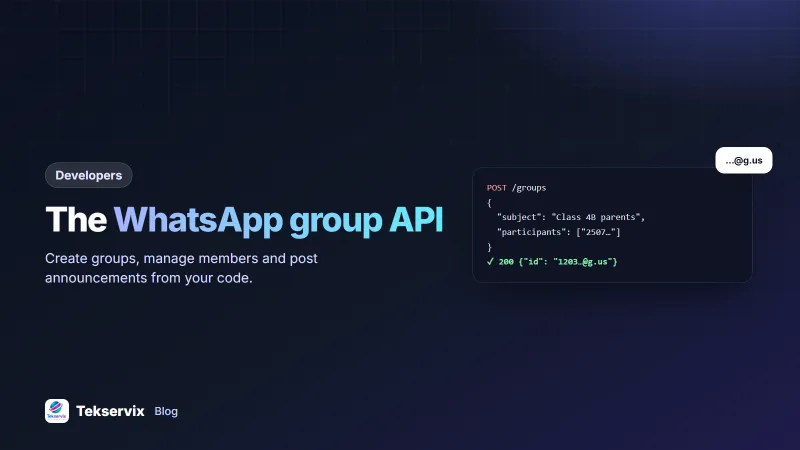
POST https://tekservix.com/wapenda/api/groups
{"subject": "Class 4B parents 2026", "participants": ["250788123456", "250722000000"]}
Your number becomes the group's admin. Then set a description and, for announcement-style groups, restrict messaging to admins:
PUT https://tekservix.com/wapenda/api/groups/120363041234567890@g.us/settings
{"description": "Official updates from the class teacher.", "announce": true, "restrict": true}
announce: true means only admins can post; restrict: true means only admins can edit the group info.
Manage members#
POST /groups/{groupJid}/participants/add     {"participants": ["250788123456"]}
POST /groups/{groupJid}/participants/remove  {"participants": ["250788123456"]}
PUT  /groups/{groupJid}/participants/update  {"participants": ["250788123456"], "action": "promote"}
A common pattern is syncing membership from your system: when a student leaves the class, a driver changes route or an employee leaves, your code removes them from the right group automatically, which is harder to forget than doing it manually.
Prefer invite links for new members#
Adding someone directly can fail: WhatsApp lets users choose who can add them to groups, and many limit it to their contacts. It's also the quickest way to get reported by someone who doesn't know you. The respectful approach is to send people the invite link and let them join:
GET /groups/{groupJid}/invite-linkSend the link in a one-to-one message or by SMS with a line explaining what the group is for. If a link is shared too widely, reset it to invalidate the old one.
Post to a group#
POST https://tekservix.com/wapenda/api/send-message
{"to": "120363041234567890@g.us", "text": "Reminder: school closes at 12:00 on Friday for the sports day. 🏃"}
Images and documents work the same way, with imageUrl or documentUrl. A weekly timetable PDF or a delivery route map can be posted automatically every Monday morning.
Read group messages#
Subscribe your webhook to messages-group.received to get only group messages, or messages.received for everything. Each event includes the group ID and the sender, so you can:
- Log questions asked in a support group and make sure each one gets an answer.
- Collect "confirmed" replies from drivers to a route announcement.
- Flag messages containing certain keywords for a moderator.
Our WhatsApp webhook guide explains how to verify and process these events.
Example: a delivery team group#
Imagine a courier company with three delivery zones. Each morning, the dispatch system creates or reuses a group per zone, syncs the members with the day's roster (adding drivers on shift, removing those who aren't), and posts the route list as a PDF at 07:30 with announce turned off so drivers can reply. Drivers answer "done 14" when stop 14 is delivered; a webhook handler reads those replies and marks each stop complete in the system. By evening, the dispatcher sees what was delivered without making a single phone call. The whole thing uses the endpoints above and a few dozen lines of code.
Permissions and admins#
Most management calls need your linked number to be an admin of the group. If you created the group through the API, it already is. For existing groups, ask a current admin to promote your number. Keep at least one human admin in every group too, so someone can step in if the automation is paused or the number is disconnected.
Groups, broadcast lists or one-to-one messages?#
| Group | Broadcast / one-to-one | |
|---|---|---|
| Members see each other | Yes: numbers are visible to all | No: each person gets a private message |
| Replies | Visible to everyone (unless admins-only) | Private to you |
| Best for | Communities that talk to each other | Customers who don't know each other |
Don't put customers who don't know each other into a group: it exposes their phone numbers to strangers, which many people rightly object to. For customer updates, send individual messages; see our broadcast list guide.
Group size and limits#
WhatsApp groups have a member limit, currently up to 1,024 people. That sounds like a lot, but large, busy groups get noisy fast, and members start muting them. For announcements to many people, an announcement-only group (where only admins can post) or one-to-one messages work better than one big open chat.
From the API side, remember that every automated post in a group lands on every member's phone at once. One mistaken message is seen by hundreds of people and can't be unseen, even if you delete it. Test group posts in a small private group with two or three colleagues before pointing the code at a real one.
Rules that keep your number safe#
- Only add people who expect it. Unexpected group adds are among the most reported behaviours on WhatsApp.
- Don't create many groups quickly. Spread group creation over time, especially on a newly linked number.
- Keep posting relevant. An announcement group that turns into daily advertising loses members fast.
- Follow WhatsApp's terms. The WhatsApp Business Policy applies to groups as well as chats.
Schools will find more ideas in WhatsApp for schools. The full list of group endpoints is in the WApenda API documentation.
For one-to-one messages from code, see how to send a WhatsApp message with Python.
Frequently asked questions
Can I send messages to a WhatsApp group through an API?
Yes. With a gateway that links your own WhatsApp number, you send to the group's ID (it ends in @g.us) exactly as you would send to a phone number. The official Cloud API has more limited group support, so check your provider.
Can an API add people to a WhatsApp group without asking them?
Technically the group admin can add participants, but WhatsApp's privacy settings let users block being added by people outside their contacts. Adding strangers also leads to reports. Share an invite link instead and let people join themselves.
How do I find a WhatsApp group's ID?
List the groups your number belongs to with the API; each result includes the group ID and name. You can also read it from any webhook event for a message posted in that group.

Tekservix Team
The team behind Tekservix
The Tekservix Team builds and supports Tekservix: WhatsApp and SMS APIs, AI tools, invoicing, PDF and SEO tools for growing businesses. We write practical, tested guides based on what we see our customers do every day.
More articles from the Tekservix Team