WhatsApp OTP Verification: Send Login Codes on WhatsApp Instead of SMS
How WhatsApp OTP verification works, when it beats SMS, how to send codes through an API, the security rules that still apply and how to fall back to SMS.
On this page
In many countries people check WhatsApp far more often than their SMS inbox. For sign-ups and logins, that means a code sent on WhatsApp is often seen sooner than one sent by text. WhatsApp OTP verification sends the one-time code as a WhatsApp message, and for many businesses it's cheaper and more reliable than SMS, especially for users abroad.
This guide explains when WhatsApp is the better channel, how to send codes through an API, and how to keep SMS as a fallback so nobody gets stuck.
When WhatsApp beats SMS for codes#
- International users. Sending SMS abroad is expensive and delivery varies by country. A WhatsApp message costs the same wherever the user is.
- Users on Wi-Fi only. Travellers with local SIMs switched off still receive WhatsApp over Wi-Fi.
- Delivery visibility. You can see when the message was delivered and read, which helps support answer "I never got the code".
- Your audience lives on WhatsApp. If most customers already talk to you there, codes from the same number look familiar and trustworthy.
SMS still wins when users may not have WhatsApp or mobile data, such as basic phones, rural areas with weak data coverage, or older customers. That's why the best setup offers both.
The flow#
- The user enters their phone number.
- Your server checks whether the number is on WhatsApp.
- If it is, generate a code, store a hash of it with an expiry, and send it on WhatsApp.
- If it isn't, or if the user taps "send by SMS instead", send the code by SMS.
- The user types the code; your server checks it, the expiry and the attempt count.
The code-handling rules are identical to SMS: random six digits from a secure generator, stored hashed, valid for five to ten minutes, around five attempts, one active code per number. Our guide to SMS OTP verification covers those rules in detail, so we'll focus here on the WhatsApp side.
Check the number first#
Sending to a number that isn't on WhatsApp wastes time and leaves the user waiting. With WApenda, one call tells you:
GET https://tekservix.com/wapenda/api/on-whatsapp/+250788123456
Authorization: Bearer wpk_your_key

{"exists": true, "jid": "250788123456@s.whatsapp.net"}
If exists is false, go straight to SMS. Our article on checking if a number is on WhatsApp covers caching and edge cases.
Send the code#
POST https://tekservix.com/wapenda/api/send-message
Authorization: Bearer wpk_your_key
Content-Type: application/json

{"to": "+250788123456",
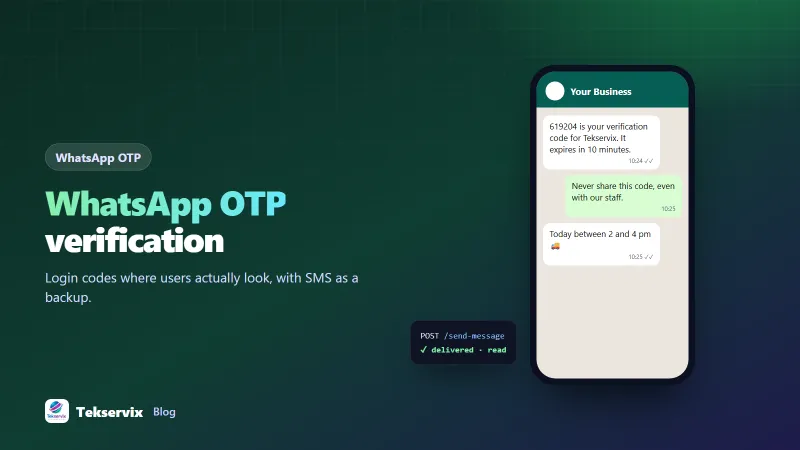
 "text": "619204 is your verification code for Tekservix. It expires in 10 minutes. Never share this code, even with our staff."}
Store the returned msgId with the code record. When a status webhook reports the message as delivered or read, you'll know the code reached the phone, which is useful when deciding whether to offer the SMS fallback.
Wording that protects users#
- Code first. It appears in the notification preview, so users don't need to open the chat.
- Name your service. People receive codes from many apps.
- Say it expires. It encourages people to act now and reduces "old code" confusion.
- Warn against sharing. The most common OTP fraud is a scammer asking the victim to read the code back.
- Keep it plain text. No links in OTP messages; links are what phishing messages use.
Fallback to SMS automatically#
Give users a way out if the WhatsApp message doesn't arrive:
- Show a "Didn't get it? Send by SMS" button after 30 to 60 seconds.
- When pressed, invalidate the WhatsApp code and send a new one by SMS.
- Rate-limit both channels together, so switching channels doesn't double the number of codes someone can request.
With SMS Gora you can send the fallback SMS from your own Android phone and SIM, so both channels come from numbers your customers recognise.
Protect the endpoint from abuse#
A "send code" button is a target for bots, whatever the channel. Limit codes per number and per IP address, add a bot check such as Cloudflare Turnstile before the first send, and alert on spikes where many codes are sent but few are verified. On WhatsApp there's an extra reason to be careful: a burst of unsolicited messages to strangers can get a number restricted. WApenda's built-in pacing and warm-up for new numbers help, but the real protection is stopping bots before they reach the send step.
Use a dedicated number for codes if volume is high#
If you send thousands of codes a day, consider linking a separate WhatsApp number just for verification, so support conversations on your main number aren't mixed with automated traffic. Both numbers can live in one dashboard; see managing multiple WhatsApp numbers.
WhatsApp OTP and the official Cloud API#
Meta's official WhatsApp Business Platform supports "authentication" message templates with copy-code and one-tap autofill buttons, charged per message by Meta. It's worth considering at very large scale or where you need those buttons. The details are in Meta's authentication templates documentation. For most small and medium businesses, sending a plain code from a linked number is simpler to set up and has no per-message fee. Our comparison of the Cloud API vs a WhatsApp gateway explains the trade-offs.
Measure it#
Track the verification rate per channel: codes verified divided by codes sent. If WhatsApp verifies noticeably more codes than SMS for your users, make it the default. If a particular country or network performs badly on one channel, route those numbers to the other. After a month of data, you'll know which channel your users prefer, based on behaviour rather than guesswork.
On Meta's official API, authentication templates are billed per message; our guide to WhatsApp Business API pricing has the details.
Frequently asked questions
Is WhatsApp OTP more secure than SMS OTP?
It avoids some SMS weaknesses, such as interception on the mobile network, and WhatsApp messages are end-to-end encrypted. It still depends on the user's WhatsApp account being secure, so use the same expiry, attempt limits and anti-abuse rules as for SMS.
What happens if the user doesn't have WhatsApp?
Check whether the number is on WhatsApp before sending. If it isn't, or the code isn't verified within a minute or two, offer to send it by SMS instead.
Can I send WhatsApp OTPs from my own business number?
Yes, with a gateway such as WApenda that links your existing number. Users see your business name and number, and the same number can handle support replies.

Tekservix Team
The team behind Tekservix
The Tekservix Team builds and supports Tekservix: WhatsApp and SMS APIs, AI tools, invoicing, PDF and SEO tools for growing businesses. We write practical, tested guides based on what we see our customers do every day.
More articles from the Tekservix Team