Receive SMS by Webhook: Handle Incoming Texts in Your App (With Code)
How to receive SMS by webhook: what the payload looks like, verifying the HMAC signature, responding fast, handling retries and duplicates, and routing replies in PHP, Node and Python.
On this page
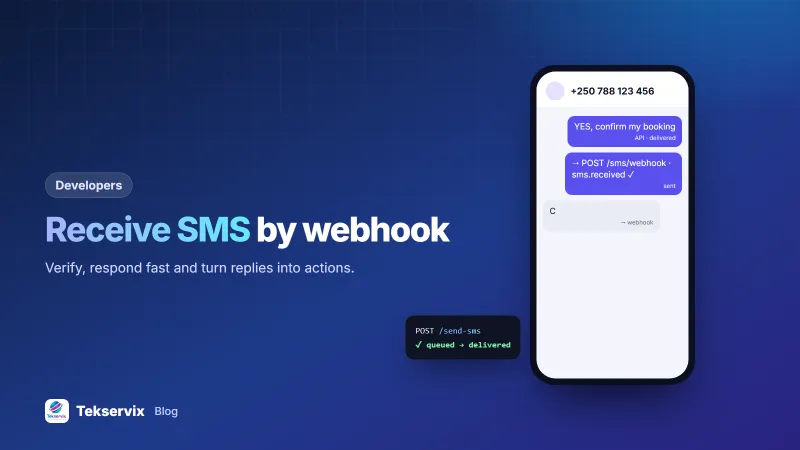
Sending texts is half of an SMS integration. The other half is what happens when people answer: "YES" to confirm an appointment, "STOP" to opt out, a question about an order. To receive SMS by webhook, you give your SMS provider a URL, and every incoming text is posted to it as JSON within seconds. Your app can then react straight away.
This guide uses SMS Gora, the Android SMS gateway from Tekservix, but the principles apply to any provider.
Webhook or polling?#
You can fetch received messages by calling the API every minute, but it's wasteful and slow. A webhook turns it around: the gateway calls you only when there's something new. Use polling only as a backup, for example a nightly job that fetches anything a failed webhook may have missed.
Set up the webhook#
- Create an HTTPS endpoint on your server, such as
https://yourapp.com/sms/webhook. - In the SMS Gora dashboard, go to Webhooks, add the URL and choose the events:
sms.received, and if you want delivery tracking,sms.sent,sms.deliveredandsms.failed. - Copy the webhook secret. You'll use it to verify each request.
On the phone side, receiving requires the "send and receive" edition of the Android app, because reading incoming SMS needs an extra permission.
What arrives#
POST /sms/webhook
Content-Type: application/json
X-SmsGora-Event: sms.received
X-SmsGora-Delivery: 99812
X-SmsGora-Signature: sha256=5d3c…

{
  "event": "sms.received",
  "timestamp": "2026-10-15T09:30:12Z",
  "device_id": 42,
  "data": {
    "id": 1875,
    "direction": "in",
    "from": "+250788123456",
    "message": "YES, confirm my booking",
    "sim_slot": 0,
    "received_at": "2026-10-15T09:30:10Z"
  }
}
Verify the signature#
Your webhook URL is public, so anyone could post fake messages to it. The signature proves a request came from the gateway: an HMAC-SHA256 of the raw request body, using your webhook secret. Compute it yourself and compare in constant time.
PHP#
$raw = file_get_contents('php://input');
$expected = 'sha256=' . hash_hmac('sha256', $raw, getenv('SMSGORA_WEBHOOK_SECRET'));
if (!hash_equals($expected, $_SERVER['HTTP_X_SMSGORA_SIGNATURE'] ?? '')) {
    http_response_code(401); exit;
}
$event = json_decode($raw, true);
Node.js (Express)#
app.post('/sms/webhook', express.raw({ type: 'application/json' }), (req, res) => {
  const expected = 'sha256=' + crypto.createHmac('sha256', process.env.SMSGORA_WEBHOOK_SECRET)
    .update(req.body).digest('hex');
  const got = req.get('X-SmsGora-Signature') || '';
  if (got.length !== expected.length || !crypto.timingSafeEqual(Buffer.from(got), Buffer.from(expected))) {
    return res.sendStatus(401);
  }
  res.sendStatus(200);
  handle(JSON.parse(req.body));
});
Python (Flask)#
raw = request.get_data()
expected = "sha256=" + hmac.new(SECRET.encode(), raw, hashlib.sha256).hexdigest()
if not hmac.compare_digest(expected, request.headers.get("X-SmsGora-Signature", "")):
    abort(401)
Use the raw body, not a re-encoded version of the parsed JSON: re-encoding can change spacing or key order and break the signature. Our general guide to webhook signature verification explains why each step matters.
Respond fast, work later#
Answer with a 2xx status within 10 seconds, or the gateway treats the delivery as failed and retries after 1 minute, 5 minutes, 30 minutes, 2 hours and 6 hours. Don't send replies, call other APIs or generate reports inside the webhook request. Save the event (to a database table or a job queue) and return 200 immediately; a background worker does the rest.
Handle duplicates#
Retries mean you may occasionally receive the same event twice. Make your handler idempotent: store data.id with a unique constraint and skip IDs you've seen. That way a retried "YES" doesn't confirm the booking twice or send two thank-you texts.
Route incoming texts#
Most apps need a small router that decides what each text means:
- Keywords: YES, C or 1 confirms; NO, R or 2 asks to reschedule. Normalise first: trim spaces, ignore case, accept "Yes!" and "yes".
- STOP and START: update the contact's opt-in status. SMS Gora applies STOP to campaigns automatically, but your own records should match. See handling SMS opt-outs.
- Context: match the sender's number to the last message you sent them. A "YES" means different things after a booking reminder and after a delivery question.
- Everything else: forward to a person, such as an inbox, a support ticket or a staff WhatsApp group.
Reply to the sender#
After processing, reply from the same phone so the conversation stays in one thread:
POST https://tekservix.com/smsgora/api/v1/devices/42/send-sms
{"recipients": ["+250788123456"], "message": "Thanks, your booking for Friday 10:00 is confirmed."}
Use the device_id from the incoming event, so the reply leaves from the number the customer texted.
Catch up after an outage#
Your server will be down at some point: a deploy, an expired certificate, a hosting problem. The gateway retries for about eight and a half hours in total, which covers most outages. For longer ones, keep a small catch-up job. Store the highest incoming message ID you have processed, and on startup (or nightly) ask for anything newer:
GET https://tekservix.com/smsgora/api/v1/received-sms?after_id=1875&limit=100Feed the results through the same handler as the webhook. Because the handler already skips IDs it has seen, running the catch-up while webhooks are also arriving does no harm.
Keep a readable history#
Store incoming and outgoing texts in one table: phone number, direction, text, time and the related record (booking, order, ticket). When a customer calls to say "I replied yesterday", staff can open the thread and see exactly what was sent and what came back. It also shows you patterns. If many people reply "what time?" to a reminder, the reminder is missing the time, and fixing one template saves dozens of replies a week.
Test locally#
To test on your own machine, expose your local server through a tunnelling tool that gives it a temporary public HTTPS address, and set that as the webhook URL. Text your gateway phone from another phone and watch the request arrive. Remember to switch the webhook back to your production URL afterwards, or add a second webhook just for testing.
Checklist#
- HTTPS endpoint, signature verified against the raw body.
- Responds within a second or two; heavy work queued.
- Duplicate event IDs ignored.
- Keywords normalised; unknown messages reach a person.
- STOP handled in your own records.
- Webhook failures logged and alerted.
The full event list is in the SMS Gora API documentation, and our SMS API guide covers the sending side. For background on the HMAC construction, see RFC 2104.
WhatsApp messages can reach your server the same way; see WhatsApp webhooks explained.
Frequently asked questions
What is an SMS webhook?
It's a URL on your server that the SMS provider calls whenever something happens, such as an incoming text or a delivery report. Your app receives the details as JSON instantly, instead of repeatedly asking the API for new messages.
Why am I receiving the same SMS webhook twice?
Providers retry when your server doesn't answer with a success code in time, and occasionally a delivery succeeds but the acknowledgement is lost. Store the message ID and ignore IDs you've already processed.
Can I test an SMS webhook on my laptop?
Yes, with a tunnelling tool that gives your local server a temporary public HTTPS address. Point the webhook at that address, send a text to your gateway phone and watch the request arrive.

Tekservix Team
The team behind Tekservix
The Tekservix Team builds and supports Tekservix: WhatsApp and SMS APIs, AI tools, invoicing, PDF and SEO tools for growing businesses. We write practical, tested guides based on what we see our customers do every day.
More articles from the Tekservix Team