How to Send Bulk WhatsApp Messages Without Getting Banned
Why WhatsApp bans numbers, and the seven sending habits that keep a bulk WhatsApp campaign safe: opt-ins, warm-up, personalisation, pacing and opt-outs.
On this page
- Why WhatsApp bans numbers that send bulk messages
- The safe bulk WhatsApp checklist
- Step 1: Build a list people actually agreed to
- Step 2: Warm up a new number
- Step 3: Personalise and vary every message
- Step 4: Send at a human pace
- Step 5: Make opting out easy
- Step 6: Clean your list before you press send
- Step 7: Answer the replies
- Broadcast lists vs a bulk sender vs the official API
- What to do if your number gets banned
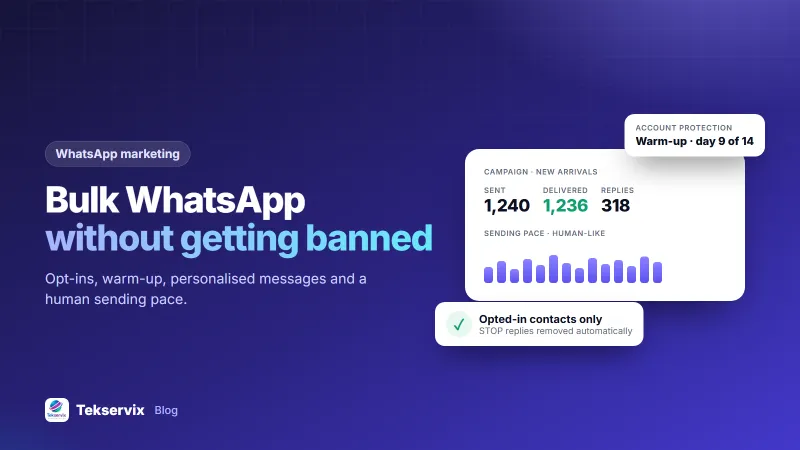
Most WhatsApp bans don't come from sending too much. They come from sending the wrong way: to people who never asked, with identical text, at machine speed, from a number nobody has ever chatted with. Get those four things right and bulk messaging becomes one of the most reliable channels a business has.
Below we explain how WhatsApp decides a number is spamming, the exact sending habits we recommend, and a step-by-step way to run a bulk WhatsApp message campaign that keeps your number healthy.
Why WhatsApp bans numbers that send bulk messages#
WhatsApp doesn't publish a "safe" number of messages per day. Instead, its systems look at how people react to what you send, and at patterns that look automated. The WhatsApp Business Messaging Policy is clear that businesses may only contact people who have given permission.
From WhatsApp's own guidance and what we see across numbers connected to our platform, these are the signals that get numbers restricted:
- Blocks and reports. This is the big one. A handful of recipients tapping "Block and report" can outweigh thousands of normal messages.
- Messaging people who don't have your number saved, especially many at once.
- Identical messages sent in a fast, regular rhythm, which no human produces.
- Sudden volume on a new or quiet number. A number that sent 5 messages last week and 2,000 today looks hijacked or rented.
- Low reply rates. Real conversations have replies. One-way blasts don't.
The safe bulk WhatsApp checklist#
To send bulk WhatsApp messages without getting banned:
- Only message people who opted in to hear from you.
- Warm up new numbers for at least a week before campaigns.
- Personalise every message and vary the wording.
- Send at a human pace with random gaps between messages.
- Give an easy opt-out and honour STOP immediately.
- Remove numbers that aren't on WhatsApp before you send.
- Reply to the responses your campaign creates.
The rest of this guide shows how to do each step in practice.
Step 1: Build a list people actually agreed to#
Permission is the foundation. Without it, no sending trick will save the number, because the blocks will come.
Good ways to collect WhatsApp opt-ins:
- A tick box at checkout: "Send me order updates and offers on WhatsApp." Leave it unticked by default.
- Click-to-chat links on your website, Instagram bio or receipts. When a customer writes first, they already know you.
- In-store QR codes that open a chat with a keyword such as "JOIN".
Never upload a list you bought or scraped. Those people didn't agree to anything, and they report fast.
Watch out: an old customer list from three years ago is almost a cold list. Send those people a single, polite message first asking whether they want updates, and only keep those who reply yes.
Step 2: Warm up a new number#
A brand-new number with no chat history that suddenly sends hundreds of messages is the classic spam pattern. Give it a normal life first.
WhatsApp publishes no official limits, so treat these as the conservative starting points we recommend, not rules:
| Period | What to do | Suggested new-contact messages per day |
|---|---|---|
| Days 1-3 | Chat normally with colleagues and existing customers; get replies | Under 20 |
| Days 4-7 | Answer inbound chats, send order updates | 20-50 |
| Week 2 | First small campaign to your most engaged opt-ins | 50-150 |
| Week 3 onward | Increase gradually while block rates stay low | Grow 20-30% a week |
WApenda does this ramp automatically for newly linked numbers, spacing messages out over the first days. You can turn it off per number once a number is established and its traffic is opted in.
Step 3: Personalise and vary every message#
Two hundred identical messages look like a machine. Two hundred messages that each greet the reader by name and phrase things slightly differently look like a business talking to customers.
- Use variables: "Hi {{name}}, your size 38 is back in stock."
- Use variations (spintax): "{Hi|Hello|Good morning} {{name}}" produces different openings automatically.
- Keep it short and specific. One offer, one link, one reason to care.
Here's a message template we'd happily send ourselves:
{Hi|Hello} {{name}}, it's Amani from {{shop_name}}. The white trainers you asked about are back in your size. Reply YES and we'll hold a pair until Friday. Reply STOP if you'd rather not get these messages.
It names the sender, refers to something the customer did, asks for a reply and offers a clear way out. Replies also tell WhatsApp that people want your messages.
Step 4: Send at a human pace#
People don't send a message every 0.4 seconds for an hour. Bulk tools should add random gaps, show a "typing…" indicator before sending, and pause between batches.
A practical pattern we use as a default:
- Random delay of several seconds between messages, not a fixed interval.
- Short breaks after every batch of 20-40 messages.
- Sending windows in the recipient's daytime, for example 9 am to 7 pm. Messages at 2 am get blocked.
In WApenda, account protection applies these delays and typing indicators for you, and campaigns can be scheduled for a sensible hour.
Step 5: Make opting out easy#
This feels backwards, but an easy opt-out protects your number. Someone who can reply STOP won't go looking for the report button.
WApenda removes anyone who replies STOP from every future campaign automatically, so a teammate can't accidentally message them again next month.
Step 6: Clean your list before you press send#
Numbers that aren't on WhatsApp, duplicates and typos all add failed sends. A campaign with a high failure rate looks careless.
- Format every number in international format, for example +250788123456.
- Remove duplicates, so nobody gets the same promotion twice.
- Check which numbers are on WhatsApp first. WApenda checks this before a campaign and skips dead numbers.
Step 7: Answer the replies#
A good campaign creates conversations. If people reply "price?" and hear nothing, some will block you. Set keyword auto-replies for the obvious questions and route the rest to a person.
Broadcast lists vs a bulk sender vs the official API#
| Option | Best for | Main limit |
|---|---|---|
| WhatsApp Business broadcast lists | Small lists typed by hand | Only people who saved your number receive it; manual work |
| Bulk sender through an API gateway | Opted-in lists of hundreds or thousands | You must follow WhatsApp's rules yourself |
| Official WhatsApp Business Platform | Very high volume, enterprise brands | Approved templates and per-message fees |
Not sure which route fits? Our guide to the WhatsApp API for small business compares costs and setup in detail.
What to do if your number gets banned#
- Stop all sending from that number immediately.
- Request a review from inside the WhatsApp app. Temporary bans often lift after a few hours or days.
- Find the cause before you send again. Usually it's a cold list or a sudden spike.
- Don't just swap in a new SIM and repeat the campaign. The same behaviour gets the new number banned too.
No tool, ours included, can override WhatsApp's policies. What good tooling can do is make the safe path the default, so your team doesn't have to remember every rule under deadline pressure.
Frequently asked questions
How many WhatsApp messages can I send per day without being banned?
WhatsApp does not publish a limit. Bans depend mostly on how recipients react, especially blocks and reports. Warm up new numbers gradually, message only opted-in contacts, and increase volume by about 20 to 30 percent a week while block rates stay low.
Why was my WhatsApp number banned after a bulk send?
The usual causes are messaging people who never agreed to hear from you, a sudden jump in volume on a new or quiet number, identical messages sent at machine speed, and many recipients blocking or reporting the number.
Is it legal to send bulk WhatsApp messages?
Sending messages to people who gave you permission is allowed by WhatsApp and is the basis of most data-protection laws. Sending to bought or scraped lists breaks WhatsApp's policy and, in many countries, privacy law.

Tekservix Team
The team behind Tekservix
The Tekservix Team builds and supports Tekservix: WhatsApp and SMS APIs, AI tools, invoicing, PDF and SEO tools for growing businesses. We write practical, tested guides based on what we see our customers do every day.
More articles from the Tekservix Team